
Cooking mode
The recipe page is built for hands-on use: cross off what you’ve done, pin the recipes you’re juggling, and keep the screen from dimming mid-step.
Crossing off steps
Tap a step heading to strike through the entire step — ingredients, instructions, and all. Tap it again to uncheck. A step nobody gave a title has no heading to tap, so it has no whole-step cross-off — check its ingredients and instructions off one at a time instead.
Crossing off ingredients and instructions
Tap any ingredient line or instruction paragraph to cross it off individually. Useful when a step has several ingredients and you want to check them off as you add them. A drawing in a round ring at the start of an ingredient line is a button: tapping it opens the ingredient’s detail panel instead of crossing the line off.
What you cross off stays crossed off on that device, through a reload, until two days after your last tap. Changing the recipe doesn’t undo it. If someone edits it in the recipe editor without renaming it, or adds or removes its photo, what you’d crossed off stays crossed off. That holds on the open page and after a reload. A line they add starts unchecked, and one they delete takes its check mark with it. A crossed-off instruction stays crossed off while its words stay the same. If they reword it, it comes back unchecked, and moving it, or splitting or joining its step, can do the same. So can adding or deleting another instruction with exactly the same words in that step.
Renaming the recipe usually starts everything fresh. So does a change that replaces the whole recipe, such as an import over it, a restore, Mirabel’s, or one from an app with agent access.
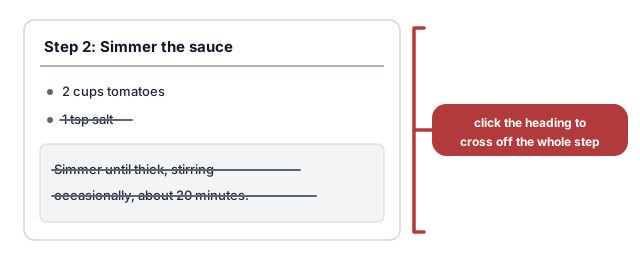
Each step is its own section. Tap the step heading to cross off everything in it — ingredients and instructions together. Tap a single ingredient or instruction line to cross off just that line, without touching the rest of the step.
Pinning recipes
When you’re cooking several recipes at once, pin them so you can flip between them fast.
When you’re signed in to your kitchen, every recipe page has a Pin button on the second row of actions below the title. Tap it to pin the recipe — the pin icon fills in. Tap Pin again to remove the pin. Each time you pin or unpin, the mirepoix menu at the top left briefly lights up, so you can see where the change landed.
Pinned recipes collect in the mirepoix menu at the top left, under a
Pinned heading. Open the menu to jump straight to any pinned recipe —
handy for moving between courses during a big meal. The recipe you pinned most
recently sits at the top. On a computer, ` opens and closes the same
menu — see keyboard shortcuts for
the full list.
Each pinned row has an ✕ at its right edge. Tap it to unpin that recipe without leaving the page you’re on — the row disappears, and when you unpin the last one the Pinned heading goes with it. You don’t have to open the recipe just to take its pin off. With the keyboard, the arrow keys step onto the ✕ just like any other row in the menu, so you can clear several pins in a row.
The pinned list is shared with everyone in your kitchen, and it updates live. When someone pins or unpins a recipe, the change shows up right away for everyone — on the recipe’s page and in the menu.
Your progress is saved
Checked state is stored in your browser and persists across page loads and app updates. If you refresh the page or come back later, your checkmarks will still be there.
Progress resets after about two days, so old checkmarks don’t pile up.
The state is per-recipe and per-device — it’s not shared with other household members or synced across devices.
Screen stays on
The app keeps your screen from dimming while you’re viewing a recipe, so you don’t have to keep tapping to stay awake in the middle of a step. The same applies on the Groceries page while shopping.
Not all browsers support this. If yours doesn’t, everything still works normally — your screen may dim after inactivity.
See also
- Scaling a recipe — halve or double a recipe before you cook it
- Recipe history — look back at earlier versions or restore one
- Menu — plan the week’s meals before you start cooking
Last updated October 14, 2026