
Pantry
The Pantry is your check before you shop — not a count of what’s on your shelves, but every ingredient your Menu calls for, asking whether you need more. Answer each row Have it or Need it. Need it puts the item on your Groceries list; Have it lets you pick when the Pantry asks again, a week or another length. Nothing moves to Groceries on its own.
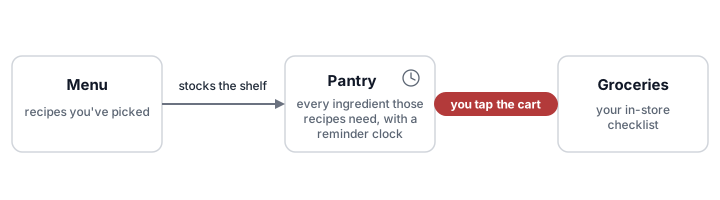
Recipes you pick on the Menu stock the Pantry, and each ingredient gets a reminder clock. An item moves on to Groceries only when you tap its Need it button — nothing crosses over on its own.
Check what you need before you shop
The Pantry opens on By aisle. It lists the rows still to check, grouped by aisle in your kitchen’s aisle order, alphabetical inside each aisle. Below the aisles sit three more groups: On the grocery list, Checked, asking later, and Not asking. To file a row under a different aisle, see Move an item to a different aisle.
- Look down the first aisle.
- Tap Need it on anything you’re short of. The item joins your grocery list.
- Tap Have it on anything you have enough of, then pick when to be asked again.
- Keep going until no aisles are left.
Each answer takes the row out of its aisle. It closes up and moves to On the grocery list or Checked, asking later — or to Not asking, if you tapped Don’t ask — and when you answer the last row in an aisle, the whole aisle goes with it. Working by keyboard, focus moves to the same button on the next row still to check, so you can answer row after row without reaching for the mouse.
When no aisles are left, the page reads Everything’s checked. Under it is a link to your list — 3 things on the grocery list — or, if you didn’t need anything, Nothing needs buying for this menu.
Undo an answer
After you answer a row still to check, a short note names the item and what happens next — Butter: on the grocery list, or Butter: asks again Sun, Sep 27 — with an Undo button. The note appears once your answer has saved, not the moment you tap.
If someone else had already put the item on the list before your Need it saved, the note says so — Butter: already on the grocery list — and has no Undo, so their item stays on the list.
Tap Undo to take the answer back. An item you said Need it to comes off the list again; an item you said Have it to is back to check today.
Don’t ask gets a note from any group, not only from the rows still to check: Salt: not asking. So does tapping Don’t ask again to turn asking back on: Salt: asking again. Each note’s Undo puts the item back the way it was.
Every one of these notes, Don’t ask’s included, goes away on its own after about five seconds. A note with Undo waits while your pointer or keyboard focus is on it.
Apart from Don’t ask, only answers to rows still to check get an Undo. For an answered row, open its ⋮ menu and tap Check again now instead — it puts the row back among the rows still to check, with no time limit on reaching it.
Read a row at a glance
Each row has the ingredient’s name, how much the Menu needs, and its buttons on the right.
- Name — the ingredient, by the catalog’s name for one Mirepoix knows: a recipe’s scallions show as Green onions. It’s the name Groceries shows, and it agrees with a single plain count the same way. Any trailing qualifier is in lighter type. An optional pill sits beside it when everything on the Menu asking for the ingredient marks it as one you can skip
- Amount — the total across every recipe and QuickBite on your Menu:
2 cups + 1 tsp. Amounts read the way they do on a recipe page —½ stick, not0.5 sticks— so the same rules apply. An ingredient asked for only “to taste”, with no amount, leaves the line blank, however many things ask for it. When some ask with an amount and others don’t, the line reads400 g, plus some more. Each recipe’s own line for the ingredient is in the row’s ⋮ menu, under Menu Items that Use This Ingredient
What the row says, and which button it offers, depends on where it stands:
| The row is… | It says | It offers |
|---|---|---|
| Still to check | Nothing — the buttons are the question | Have it and Need it |
| On your grocery list | On the list | Have it |
| Answered, or recently bought | asking and the day it will ask again — asking Oct 1, or asking 1 Oct in a kitchen set to day-first dates | Need it |
| Set to Don’t ask | Not asking | Need it |
A length picked from Have it on a row that’s on your list takes the item off the list too. On a row set to Don’t ask, Have it just takes the item off the list, with no lengths to pick, and the row goes back to Not asking. Tapping Skip this trip on the item’s Groceries row answers it the way 1 week does. Need it on an answered row puts the item on your list and leaves its reminder where it was. On an item still crossed off on Groceries, it undoes the buy.
The day a row is asking on follows your kitchen’s date order, and adds the year when it falls in a different one.
A small ring on a row’s ⋮ means a recommended length is waiting in that menu — see Set how often an item is checked.
An open ⋮ menu stays open when someone else’s device changes a different row. It keeps what it showed when you opened it, and anything you’d typed in it. A change to the menu’s own row closes it; open it again to see the row’s current choices.
Pick when it asks again
Tap Have it to see when the Pantry can ask again. Under Have it, ask again in… are five lengths, shortest first:
- A few days — 3 days
- 1 week — 7 days
- 2 weeks — 14 days
- 4 weeks — 28 days
- 12 weeks — 84 days
Each length names the day it lands on, counted from today: a weekday for the first two — Sun beside 1 week — and a date for the rest — Oct 25 beside 4 weeks, or 25 Oct in a kitchen set to day-first dates. Every length past A few days is whole weeks, so it lands on the weekday you’re looking at now.
Tapping Have it answers nothing by itself; picking a length is the answer. It sets when the row asks again, and takes the item off your grocery list if it was on it. It’s a one-time answer — it doesn’t change how often the item is checked after you buy it.
An answered row has no Have it. To change when it asks again, open its ⋮ menu: the same five lengths are there, under Check again now.
A row set to Don’t ask doesn’t offer these lengths, since the Pantry isn’t asking about it.
Set how often an item is checked
Open a row’s ⋮ menu. Under After I buy, ask again in… is a row of four lengths, captioned weeks: 1, 2, 4, and 12. Tap one to pick it.
The length the item is using now is highlighted — the one you picked, or its built-in length if you haven’t picked one. A screen reader reads each length with its unit, 1 week or 12 weeks, and says which one is in use.
When the Pantry recommends another length, the caption names it — weeks · 4 recommended — and a screen reader says recommended on that length. The recommendation is one step shorter or longer than the length in use:
- Shorter when you run out early. You put the item on your grocery list before the Pantry asked, and before that length had passed since your last buy
- Longer when you pick 1 week or longer under Have it, ask again in… three times since your last buy on Groceries, while the item isn’t on your grocery list. A few days doesn’t count, and neither does Skip this trip on Groceries
Nothing you do on a row set to Don’t ask counts toward a recommendation.
The recommendation never changes how often the Pantry asks; only a length you pick does. Tap the recommended length to take it, or tap the highlighted one to stay on that length. Either way, the recommendation goes. Staying on the highlighted length changes nothing else, so an item on its built-in length keeps it.
Every time you cross the item off on Groceries, the clock restarts from this length. Flour set to 4 weeks goes quiet for four weeks after each buy, then asks again. A length you pick while the item is still crossed out on Groceries applies to that buy.
Otherwise, a length here never pushes a reminder away. If the row is due to ask later than the length you pick, the Pantry pulls it in to match; if it’s already sooner, nothing changes. Picking a longer length takes effect at your next buy. It doesn’t touch your grocery list either.
On a row set to Don’t ask, picking a length works differently — see the next section.
Stop asking about an item
For something you never want reminding about, like salt, open the row’s ⋮ menu and tap Don’t ask, under the weeks. The Pantry stops asking about the item. Its row moves to Not asking, where it reads Not asking and offers Need it, and a note says Salt: not asking, with Undo.
While the Pantry isn’t asking about an item:
- It counts as on hand: in a Menu recipe’s Missing and Probably have breakdown, when you ask Mirabel whether you have it, and when a connected app or tool checks the Pantry
- Its ⋮ menu has no Have it, ask again in… lengths, no length on the weeks track is highlighted, and Don’t ask carries a ✓
- It still shows on the Pantry whenever something on your Menu calls for it, like any other row
- Don’t ask doesn’t change whether recipes count it toward nutrition — see Leaving an ingredient out of nutrition
Ran out? Tap Need it. The item goes on your grocery list and its row moves to On the grocery list. Until you buy it, it counts as missing, not on hand. Once you cross it off on Groceries, the row goes back to Not asking, and the Pantry still doesn’t ask. Taking it off the list without buying — Have it on the row, Take it off the grocery list in its ⋮ menu, or Skip this trip on Groceries — sends the row back to Not asking too.
To start asking again, do one of these:
- Tap Don’t ask again. The row goes back to wherever its reminder puts it — still to check, or Checked, asking later — or stays on your grocery list if it’s there. A note says Salt: asking again, with Undo
- Pick a length on the weeks track. The Pantry asks about the item today, and after each buy it waits that length. An item on your grocery list stays on it
Take an item off the grocery list
On a row that’s on your list, open the ⋮ menu and tap Take it off the grocery list, at the top. The item leaves the list without touching its reminder, so the row goes back to wherever its clock puts it — still to check, or asking later.
To take it off and be asked again in a week instead, tap Have it on the row and pick 1 week.
Move an item to a different aisle
Open a row’s ⋮ menu. Below the lengths is the item’s aisle, under Aisle — or Default aisle once your kitchen has a store. The menu lists your kitchen’s aisles, with the item’s current one selected.
Pick an aisle, and the item moves to it straight away; the ⋮ menu closes.
To make a new aisle, pick New aisle…, the last entry, and type the name in the New aisle name box that appears. Press Enter, or tap Done on a phone’s keyboard, and the item moves under the new aisle; leaving the box with a name typed in moves it too. Press Escape in that box to back out: the menu goes back to the item’s aisle, and the ⋮ menu stays open. Capitalization and spacing don’t make a second aisle — see Make a new aisle.
In By aisle, a row still to check moves under its new aisle’s heading, on every device showing the Pantry. The three groups at the bottom don’t split by aisle, and neither do By recipe and By reminder interval, so rows there stay put. The ⋮ menu shows the new aisle the next time you open it.
A move isn’t an answer, so it doesn’t change whether the row is still to check, on the list, or asking later. There’s no Undo. To move it back, pick its old aisle again.
It’s the same aisle you set from an item’s ⋮ menu on Groceries. Change it here and the item moves on your grocery list too.
With stores set up, this is the default aisle: where the item falls wherever a store has no aisle of its own for it. A store’s own Aisle at <store>, set on Groceries while you shop it, still wins at that store — see Set an aisle for the store you’re shopping.
You need a signal to move an item. Without one, the row’s ⋮ doesn’t open, and tapping it says Needs a signal to update the pantry.
See when you last bought an item
Open a row’s ⋮ menu. Under the lengths in After I buy, ask again in…, it reads Last bought, a date and how long ago — Aug 10 (2 weeks ago), or 10 Aug in a kitchen set to day-first dates (the date order is yours). A buy from an earlier year adds the year: Aug 10, 2025.
At the bottom of the menu, Menu Items that Use This Ingredient shows each recipe and QuickBite on your Menu that calls for the ingredient, each in a box of its own: its title first, then its own line as the recipe reads now. A QuickBite carries a QuickBite label. Tap a title to open the recipe, or a QuickBite’s place on the Menu. The lines are the same ones the Groceries ⋮ shows.
The date is the day you crossed the item off on Groceries. Undo that within the hour, by unchecking it there or tapping Need it here, and the date goes back. Any other answer, or changing how often it’s checked, leaves the date alone.
A row folding more than one ingredient — a Lemon row carrying a recipe’s lemon juice — shows the latest buy of the thing you shop for. An item with no recorded buy has no Last bought line at all, and that includes anything last bought before Mirepoix started keeping the date.
Switch the view
The menu at the top left of the page names the view you’re in. Tap it to pick another:
- By aisle (the default) is the check itself: rows still to check by aisle, then On the grocery list, then Checked, asking later, then Not asking
- By recipe groups every row by what it’s for — recipes and QuickBites together, alphabetical by title. An ingredient used in more than one shows up under each. Each group counts where it stands: 2 to check, 1 on the list, or all checked
- By reminder interval groups every row by how often it’s checked: Every 12 weeks first, then Every 4 weeks, Every 2 weeks and Every week, and last Not asking, for rows set to Don’t ask. Each counts where it stands as By recipe does. Inside a group, the rows most overdue come first. It’s a quick way to look over your lengths, and to see whether the long-interval staples need restocking. The menu shows this view as By interval
Your answers work the same way in every view, Undo included. In By recipe and By reminder interval, an answered row stays in its group and changes in place; picking a new length under After I buy, ask again in… moves the row to that length’s group. In By reminder interval, Don’t ask moves the row to Not asking; in By recipe, it stays in its group.
Your choice of view is remembered on this device.
Fold a group
Tap any group’s heading to fold it shut; tap again to open it. In By aisle, Checked, asking later and Not asking start folded, and the three groups at the bottom show how many rows they hold.
A group you fold stays folded when the page updates from someone else’s device. Reloading the page opens them all again, except Checked, asking later and Not asking.
Search the Pantry
Tap Search pantry… at the top right of the page and type to filter the rows in the view you’re on. A row matches when your text appears in the ingredient name or in the title of any recipe or QuickBite it belongs to — so typing a recipe name finds every ingredient it uses. The name can be the one the row shows or the one your recipes first used for it. If your oldest recipe with the item says scallions, scallions finds the Green onions row, but spring onions from a newer recipe doesn’t. Type more than one word to narrow further: a row has to match every word. Accents and curly quotes don’t matter — “jalapeno” finds “jalapeño.”
Tap the ✕ beside the field to clear it and close it.
Swap in a substitute
A recipe line can offer a substitute — - Buttermilk, 1/2 cup; or Milk, 1/2 cup, see Recipe format. That ingredient’s row carries a chip under its name: swap to milk ⇄. Tap it and the Pantry switches over to the substitute — a milk row in place of the buttermilk one, unless something else on the Menu still calls for buttermilk.
The choice belongs to your kitchen and shows on everyone’s screen. It doesn’t edit the recipe. Full behavior is on Groceries.
Parts you don’t buy on their own
A recipe line naming a part of something — lemon zest, an egg yolk, cooked rice — shelves under the thing you actually buy. A tart calling for lemon zest gives you a Lemon row, not a lemon-zest one, and the amount says what the recipe asked for: 2 tbsp lemon zest.
If another recipe on your Menu wants whole lemons, both share that one row and both amounts show, side by side and never added together — Mirepoix won’t convert tablespoons of zest into a number of lemons, because there’s no honest conversion to make.
The row’s reminder is the one for the thing you buy. A length or Check again now on the row applies to that one reminder, whatever’s folded into it. Taking the row off your grocery list — with a length from Have it, or Take it off the grocery list — clears everything folded into it, so a zest line can’t leave something behind on the list. Which ingredients pair up is built in — there’s nothing to set. Full behavior is on Groceries.
How the Pantry is built
The Pantry is built from the recipes and QuickBites currently selected on the Menu. Unselect a recipe and its ingredients leave the Pantry — but each one’s reminder and length are kept. Select the recipe again and the rows come back with their reminders intact.
Each row’s reminder counts down on its own. When it runs out, the row is back among the rows still to check — unless it’s set to Don’t ask.
An ingredient you’ve never bought has no reminder yet. Rather than assume it’s already on your shelf, the Pantry lists it to check the first time a recipe calls for it.
Buying an item quiets it. Once you cross it off on Groceries, the clock restarts from the length under After I buy, ask again in…, and the row sits in Checked, asking later until it runs out — the same as one you answered Have it.
If the Menu has nothing selected, the Pantry says No items on the menu — pick some recipes from the Menu.
See also
Last updated October 15, 2026