
Nutrition
Mirepoix shows a nutrition panel under each recipe, computed from your ingredient catalog and the recipe’s quantities.
The display is off by default. In Settings, turn on Display nutrition information under recipes to enable it kitchen-wide.
What gets measured
Mirepoix tracks 11 nutrients per ingredient. The panel shows nine of them; the other two (trans fat, added sugars) are stored for future use but not shown today.
| Nutrient | Unit | Daily value |
|---|---|---|
| Calories | — | — |
| Fat | g | 78 g |
| Saturated fat | g | 20 g |
| Cholesterol | mg | 300 mg |
| Sodium | mg | 2,300 mg |
| Carbs | g | 275 g |
| Fiber | g | 28 g |
| Sugars | g | — |
| Protein | g | 50 g |
Daily values follow the FDA’s 2,000-calorie reference diet. Each nutrient on the panel shows the amount in one serving and, where a daily value exists, that amount as a share of it — written % DV.
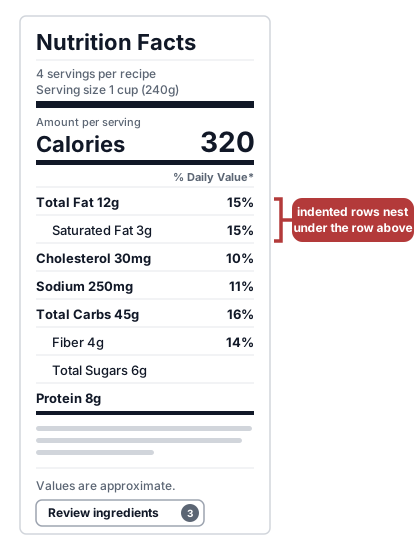
The panel is one card. At the top, Serving size and Servings sit on the left, with the calories in one serving large on the right. Under them, three tiles — Fat, Carbs, Protein — each with grams and a % DV. Below that, the rest of the nutrients in a list — Saturated fat, Cholesterol, Sodium, Fiber, Sugars — each with its amount and, in a % DV column down the right edge, its share of a daily value; Sugars has no daily value, so that cell is empty. A note explains % DV. Every ingredient of this example is counted, so it has no Not counted line. The numbers shown are examples.
How a recipe gets its nutrition
- Each ingredient name is looked up in your ingredient catalog.
- The recipe’s quantity for that ingredient is converted to grams using the catalog’s volume conversion, per-item weight, or named portion. A parenthetical weight you wrote yourself, like
3 ears (300 g), comes first — trusted outright since you measured that recipe directly. Other parenthetical measures, like2 leeks (1 cup), are used when the main unit can’t be converted. A ranged amount, like2-3 cloves, counts as its midpoint — 2½ cloves — in the totals; the recipe still displays the full range. - Per-gram nutrient rates are scaled by the gram total and summed across ingredients.
- The total is divided by the serving count to produce the per-serving values shown on the panel.
A line carrying a package gives step 2 one more figure to work from. 2 cans, 14½ oz each is 29 oz in all, and Mirepoix can weigh the line from that figure whenever it can weigh the size itself: a weight like ounces or grams, a volume the catalog has a density for, a portion word the ingredient’s catalog entry defines — 2 boxes, 1 stick each for butter, 2 packages, 1 roast each for beef chuck — or no unit at all, as in 2 boxes, 12 each, which counts as 12 of the item per box. A size in a word the catalog can’t weigh for that ingredient is kept and shown on the recipe page, but nothing is weighed from it — it’s one of the lines that can’t be weighed, and the line’s info panel on the recipe page names that reason.
Which figure wins depends on the size. A size in a weight — ounces, grams, pounds — is the recipe’s own word on what’s in the can, so it’s used ahead of a portion the catalog has on file, just as a weight in parentheses like 2 cans (29 oz) would be. A size in a volume, a portion word or a plain count is tried last: when the catalog has a portion on file for the kind — a weight for one can of that ingredient — that portion is used instead, and the package only weighs a line nothing else could. When a package line’s grams come from one of those two figures rather than from the amount you typed, the info panel’s conversion line says which — → 822g · from the package label for the 29 oz above, or something like → 720g · from the catalog's can portion for a can whose size isn’t a weight.
The serving count comes from the Serves: front-matter line. If Serves: is absent, the Makes: count is used instead. Makes: 12 pancakes divides by 12 and shows 1 pancake as the serving size — Mirepoix knows the singular of the words it’s been taught, and a word it hasn’t been taught is kept exactly as you wrote it at every count rather than given a singular Mirepoix would have to guess at. A range divides by its rounded midpoint — Serves: 4-6 divides by 5, and Makes: 12-15 cookies shows per-cookie values for 14 cookies.
The result is cached on the recipe. It refreshes when you save the recipe, when an embedded recipe’s nutrition changes, or when the catalog’s figures for an ingredient it uses change. The serving word itself is not part of that cache — it’s worked out fresh each time the page is drawn, so a word Mirepoix newly recognises shows up on the next page load.
What you’ll see on the panel
The panel reads top to bottom:
- Serving size and Servings on the left — one serving described in the recipe’s own terms, with its weight in grams, and how many servings the recipe makes
- The calories in one serving, large, on the right, with the word calories under the figure
- Not counted: 3 ingredients under the calories, with the recipe’s own count, whenever some ingredients aren’t counted. Tap it to see their names. Kitchen members also get an Edit recipe link beside it; visitors see the line without the link
- Three tiles — Fat, Carbs, Protein — each with the amount in one serving and its % DV
- The rest of the nutrients in a list, in this order: Saturated fat, Cholesterol, Sodium, Fiber, Sugars. Each shows its amount, and a % DV column runs down the right. Sugars has no daily value, so that cell is empty
- % DV is the share of a 2,000-calorie day. under the list
Nothing on the panel is indented or nested. Checking which ingredient each line is matched to isn’t on the panel either. While any line of the recipe isn’t matched, kitchen members see 3 ingredients to check — with the recipe’s own count — in the quieter second row of buttons under the recipe, beside History, Pin, Star, the menu button, and Add photo. It shows whether or not this kitchen shows nutrition, since a line’s match also feeds your grocery list and your Pantry.
Each ingredient row starts with the ingredient’s drawing, the same one its Groceries item shows. On ingredients the panel has an opinion about — counted or not — the drawing sits in a round ring and is a button; tap it to open a panel with that ingredient’s detail. A screen reader calls it Ingredient detail for and the ingredient’s name. For a counted ingredient, the panel shows the conversion to grams (when the amount the math used isn’t already in grams) and its contribution: calories, protein, fat, carbs, sodium, fiber. The figures follow the amount shown on the ingredient’s own row, so scaling the recipe scales the panel with it. For an ingredient left out of the totals, the panel names the reason instead — one of the four in the next section. For a line whose amount is a phrase like to taste, the panel says so using the phrase it recognizes, rather than calling it no amount. An ingredient left out of nutrition — water, tap water, ice, or one your kitchen set to be left out — shows its drawing with no ring and no button, since the panel never weighed it. For kitchen members, the panel ends with Last bought: and the date you last bought the ingredient — the same date its Pantry row shows, so a line calling for lemon juice shows when you last bought lemons. An ingredient with no recorded buy shows no date.
Why some ingredients aren’t counted
An ingredient stays out of the totals when Mirepoix can’t measure it. There are four reasons:
- No catalog match — no catalog entry for this name, so nothing can be calculated for it. The line’s info panel reads “Not in ingredient catalog”
- Can’t be weighed — the catalog has an entry, but the recipe’s unit can’t be converted to grams and the line carries no parenthetical measure to fall back on (for example, “1 bunch” with no defined weight for
bunch). The line’s info panel reads “In catalog, but no weight on file for this unit, so it isn’t counted” - No quantity — the ingredient has no amount at all (such as a bare “Salt”), or its amount is a phrase with no number in it, like “to taste”, so there’s nothing to weigh
- No nutrition data — the name matches a catalog entry, but that entry has no nutrient values on file. The line’s info panel reads “In catalog, but no nutrition data”
A line left out for No catalog match, Can’t be weighed, or No nutrition data is marked on the recipe page: its ring is dashed, its drawing is faded, and a small ? sits on the ring’s corner. A screen reader adds “not counted in nutrition” to the button’s name. A line with no amount to weigh, such as one whose amount reads “to taste”, isn’t marked — leaving those out is expected, not something to fix. That holds even when its name has no catalog match: matching it still wouldn’t give it an amount to count.
On a marked line, kitchen members see Report this in the info panel, under the reason. Tap it to tell Mirepoix about the gap, so the shared catalog can be fixed for every kitchen. The button gives way to Thanks, we’ll take a look; close the panel and the button is back. That’s the whole exchange: there’s no status to check and no reply, and reporting changes nothing about the ingredient for your kitchen. The line stays uncounted until the catalog can count it. A report carries the line’s text, but not your kitchen, your name or the recipe’s title; Data and privacy says who reads it and how long it’s kept. Visitors and people outside your kitchen don’t see the button.
Whenever any ingredient is uncounted, the panel keeps its figures and says so under the calories — Not counted: 3 ingredients — so a total that leaves something out never looks complete. Tap the line to see which. The names are the ones the totals work from: a matched line shows its catalog entry’s name, which may not read exactly as you typed it, and an ingredient from a recipe this one includes is listed too. The first reason is the one you settle in the recipe editor: choose the ingredient the line means (see Check ingredients), and Mirepoix counts it from that ingredient. A substitute your kitchen has switched to is the exception, since the editor doesn’t match substitutes: tap Report this in its panel instead. Of the other three, No quantity wants an amount in the recipe. Can’t be weighed and No nutrition data want a weight or nutrients on the ingredient’s catalog entry: tap Report this so the shared catalog can get them for every kitchen.
A line you chose to keep as written in the editor is left out of the totals on purpose. It isn’t one of these four reasons.
A line with a substitute counts the version your kitchen has picked. After you swap in a substitute, the totals count the substitute instead of the ingredient written first, for everyone in the kitchen, and the line’s detail panel describes the substitute. That holds even for a line you kept as written: once switched, it counts the substitute. An optional line still counts whether or not you plan to use it.
A recipe with at least one ingredient that contributes positive nutrients shows the full panel. A recipe with no usable nutrition data shows a pared-down card instead, reading “Nutrition isn’t available for this recipe yet.”, with the Not counted line under it. That card is for kitchen members; a signed-out visitor viewing the recipe sees nothing.
Ingredients you don’t want counted
Water, tap water, and ice never count toward the totals. In the app, only Mirepoix’s operator has a control for leaving out another ingredient, but one your kitchen set to be left out stays left out — see Leaving an ingredient out of nutrition. Left-out ingredients are stripped from the calculation before any unit conversion runs. That changes only nutrition: such an ingredient still shows on your Pantry and grocery list.
See also
- Check ingredients — choose the ingredient a recipe line means, in the editor
- Nutrition data — where an ingredient’s figures come from, and how to report a gap
- Ingredient catalog — the catalog the calculator reads from
- Import a recipe with AI — where unrecognized ingredients come up for matching
- Settings — the kitchen-wide toggle
Last updated October 15, 2026